You’ve built a website, published content, and waited patiently.
But when you search for your business on Google, nothing appears.
You’re not alone in this frustration.
Thousands of website owners face this problem daily, and the good news is that it’s almost always fixable.
What Does It Mean to “Show Up” in Google Search?
When we talk about showing up in Google search, we’re referring to your website appearing in the search engine results pages (SERPs) when someone types in relevant queries.
For example, SEO Assistant Google search presence.
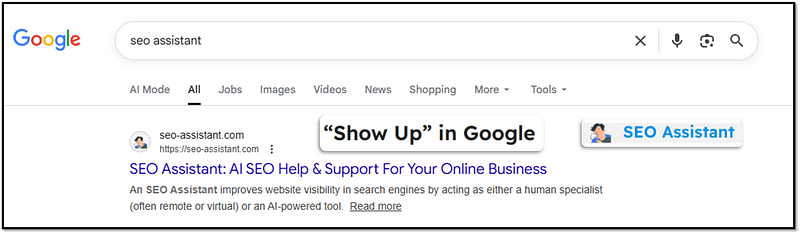
This search visibility can happen in several ways:
- Organic search results are the main listings that appear based on Google’s ranking algorithm. These are the unpaid results that most users click on.
- Local pack results show up for location-based searches, displaying businesses with Google Business Profiles in a map format.
- Featured snippets appear at the top of results, providing direct answers to user questions.
- Rich results snippets show up for specific events, products, services, articles, FAQs, or videos.
The absence of your website from these results means potential customers can’t find you, which directly impacts your traffic, leads, and revenue.
The Top 10 Reasons Your Website Isn’t Showing Up (And What They Mean for Your Business)
1. Website Indexing by Google
What this means: Google’s crawlers haven’t discovered your website yet, or they’ve found it but haven’t added it to Google’s massive database of web pages.
Think of indexing as getting your business listed in a phone book. If you’re not in the directory, people can’t look you up.
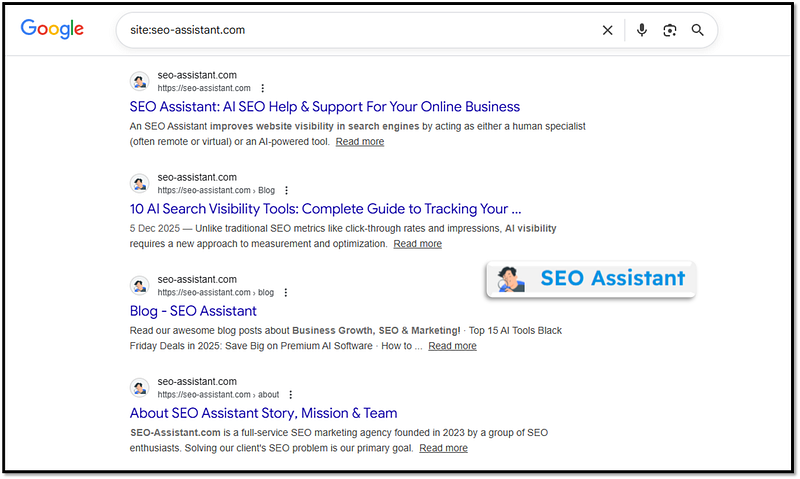
For example, you can check your website indexing with this query: site:yourwebsiteaddress.com.
Here’s a snapshot of the SEO-Assistant.com site indexed by Google.
Business impact: Zero visibility equals zero organic traffic.
Every day your site remains unindexed, you’re losing potential customers to visible competitors.
How to fix it:
- Submit your sitemap directly through Google Search Console and Bing Console
- Use the URL Inspection tool in Search Console to request indexing for individual pages
- Ensure your robots.txt file isn’t blocking Google’s crawlers
- Build a few quality backlinks from indexed websites to help Google discover your site
- Check that your site doesn’t have “noindex” tags in the HTML that tell search engines to ignore your pages
2. Technical SEO Issues Are Blocking Search Engines
What this means: Your website has technical barriers preventing search engines from properly crawling and understanding your content.
These might include server errors, incorrect robot directives, or SSL certificate problems.
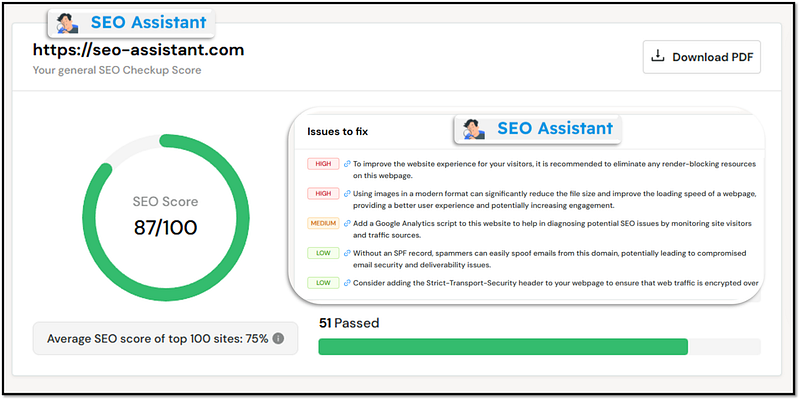
For example, you can check technical issues with the SEO tools. We used a free tool called SEO Site Checkup.
Our website SEO score is 87 out of 100. This tool has identified six SEO issues on our website, along with recommended fixes.
Our SEO report link: https://seositecheckup.com/seo-audit/seo-assistant.com
Business impact: Even if you have great content, technical issues create a wall between you and your audience.
This is like having a store with a broken door lock that won’t let customers inside.
How to fix it:
- Install an SSL certificate to enable HTTPS (Google prioritizes secure sites in 2026)
- Fix any 404 errors or broken links using tools like Screaming Frog or Semrush
- Ensure your server response time is under 200ms for optimal performance
- Remove any accidental “noindex” tags from important pages
- Check your robots.txt file to ensure it’s not blocking important sections of your site
- Implement proper canonical tags to avoid duplicate content issues
3. Your Website Is Brand New and in the Google Sandbox
What this means: Google often places new websites in a temporary “holding pattern” where they don’t rank well for competitive keywords.
This isn’t a penalty but rather a trust-building period that can last anywhere from a few weeks to several months.
Business impact: Your launch momentum gets delayed, and early revenue projections may fall short.
However, this is temporary if you play by the rules.
How to fix it:
- Focus on creating high-quality, original content consistently
- Build your brand presence on social media and other platforms
- Earn natural backlinks from reputable websites in your industry
- Be patient and avoid black hat SEO tactics that could trigger real penalties
- Target long-tail, less competitive keywords initially while building authority
4. Poor or Missing Content
What this means: Your pages contain thin content (under 300 words), duplicate content copied from other sites, or AI-generated text without proper editing and value addition.
This is the content on your website that adds little or no value to your website readers.
Google’s algorithms in 2026 are sophisticated enough to detect issues with content quality.
Business impact: Search engines prioritize websites that provide genuine value. Poor content means low rankings, high bounce rates, and damaged credibility with both users and search engines.
How to fix it:
- Aim for comprehensive content that thoroughly answers user questions (typically 1,000+ words for main pages)
- Add unique insights, data, examples, or case studies that competitors don’t have
- Update outdated content regularly to keep information current
- If using AI writing tools, heavily edit and personalize the output with human expertise
- Include multimedia elements like images, videos, and infographics to enhance user experience
- Structure content with clear headings (H1, H2, H3) for better readability
5. Zero or Low-Quality Backlinks
What this means: Other websites aren’t linking to your content, or the sites that do link to you are spammy or irrelevant.
Backlinks remain one of Google’s top ranking signals because they serve as votes of confidence from other websites.
Here’s a backlink profile for seo-assistant.com.
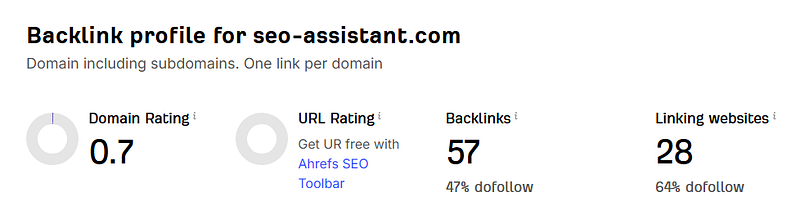
Free tool to check backlinks for free: https://ahrefs.com/backlink-checker/
Business impact: Without backlinks, you lack authority in Google’s eyes.
This makes it nearly impossible to rank for competitive terms, leaving you invisible in your industry.
How to fix it:
- Create linkable assets like original research, comprehensive guides, or useful tools
- Reach out to industry publications and offer to contribute expert articles
- Get listed in relevant business directories and industry-specific listings
- Build relationships with other businesses and websites in your niche
- Create shareable infographics or data visualizations that others want to reference
- Avoid buying links or participating in link schemes, which can result in penalties
6. Website Speed and Core Web Vitals Issues
What this means: Your website loads slowly or provides a poor user experience on mobile devices.
Google’s Core Web Vitals (Largest Contentful Paint, First Input Delay, and Cumulative Layout Shift) directly impact rankings in 2026.
Here’s a snapshot of the website speed report for the SEO Assistant site.
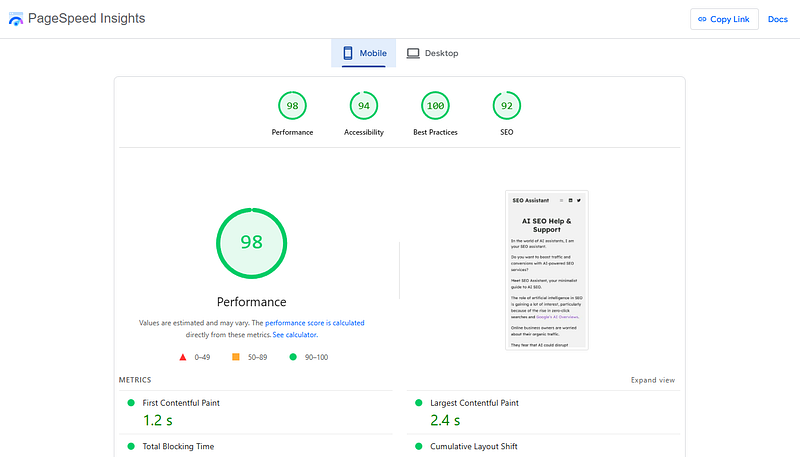
Free tool to check site speed: https://pagespeed.web.dev/
This free tool helps you discover what your real users are experiencing on your website.
Business impact: Studies show that 53% of mobile users abandon sites that take longer than three seconds to load.
Slow sites lose both rankings and conversions, creating a double hit to your revenue.
How to fix it:
- Compress and optimize all images (use WebP format for better compression)
- Implement lazy loading for images and videos
- Minimize JavaScript and CSS files
- Use a content delivery network (CDN) to serve content faster globally
- Choose a reliable, fast hosting provider
- Enable browser caching
- Remove unused plugins and scripts that slow down your site
7. Mobile Optimization Problems
What this means: Your website doesn’t work properly on smartphones and tablets.
Since Google uses mobile-first indexing, it primarily uses the mobile version of your site for ranking and indexing.
Business impact: With over 60% of searches happening on mobile devices, a non-mobile-friendly site excludes the majority of potential visitors and virtually guarantees poor rankings.
How to fix it:
- Use a responsive design that automatically adjusts to different screen sizes
- Test your site using Google’s Mobile-Friendly Test tool
- Ensure buttons and links are easily tappable (at least 48×48 pixels)
- Make text readable without zooming (at least 16px font size)
- Avoid using Flash or other outdated technologies not supported on mobile
- Optimize mobile page speed separately from desktop
8. Local SEO Neglect (For Local Businesses)
What this means: You haven’t claimed or optimized your Google Business Profile, or your local citations are inconsistent across the web.
Local SEO is critical for businesses serving specific geographic areas.
Business impact: When potential customers search for services “near me” or in your city, your competitors appear while you remain invisible.
This directly translates to lost foot traffic and local customers.
How to fix it:
- Claim and fully optimize your Google Business Profile with accurate hours, photos, and categories
- Ensure your NAP (Name, Address, Phone) is consistent across all online directories
- Encourage satisfied customers to leave Google reviews
- Create location-specific content on your website
- Build citations in local directories like Yelp, Yellow Pages, and industry-specific platforms
- Use local keywords naturally in your content and meta tags
9. Algorithm Penalties or Manual Actions
What this means: Google has detected violations of its webmaster guidelines and has either algorithmically demoted your site or applied a manual penalty.
This is the most serious issue and requires immediate attention.
Business impact: Penalties can result in dramatic traffic drops of 50-95% overnight. (Source: https://stakque.com/)
Your business effectively becomes invisible online until the issue is resolved.
How to fix it:
- Check Google Search Console for any manual action notifications
- If penalized, identify and remove the violating content or links
- Submit a reconsideration request after fixing issues (for manual penalties)
- For algorithmic demotions, focus on creating high quality content and earning natural links
- Avoid keyword stuffing, cloaking, hidden text, or any manipulative tactics
- Disavow toxic backlinks that may be harming your site
10. Targeting Keywords That Are Too Competitive
What this means: You’re trying to rank for extremely popular keywords dominated by established, high-authority websites.
A brand new website selling shoes won’t outrank Nike or Amazon for “buy shoes online.”
For example, “SEO” as a keyword is too competitive for our business and brands that rank are Google, Wikipedia, Moz, etc.
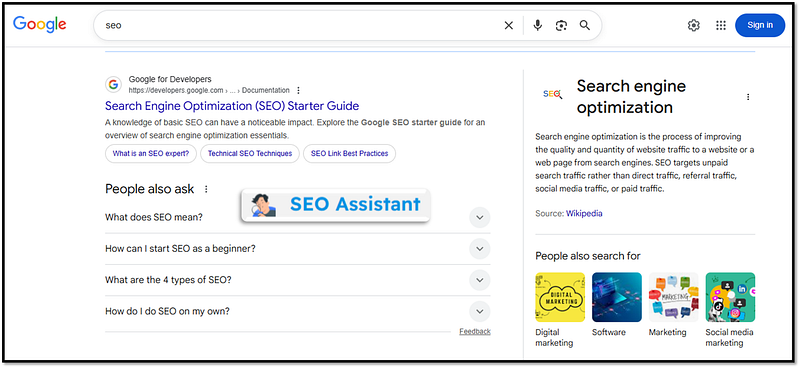
Business impact: You waste time and resources creating content that will never rank, leading to frustration and minimal return on your SEO investment.
How to fix it:
- Use keyword research tools (Ahrefs, LowFruits, or Google Keyword Planner) to find keyword difficulty scores
- Target long-tail keywords with lower competition and higher intent
- Focus on question-based keywords that match your expertise
- Build topical authority by thoroughly covering niche subtopics before tackling broader terms
- Monitor your competitors’ keyword strategies to find gaps you can exploit
8 Best Practices to Follow for Getting Your Website to Show Up in Google (2026 Edition)
1. Start with Search Console from day one.
This free tool from Google is your direct line of communication with the search engine.
It shows you exactly how Google sees your site, what errors exist, and which pages are indexed.
Here’s the link: https://search.google.com/search-console/about
2. Create a comprehensive content strategy.
Don’t just publish random articles. Follow the content plan that suits your business.
Two Examples to make you understand:
A local boutique clothing store thrives when its content plan focuses on style inspiration, seasonal lookbooks, and behind-the-scenes glimpses of new arrivals, helping customers connect emotionally with the brand and see how products fit into their lifestyle.
A tech startup offering a SaaS product should focus on tutorials, case studies, and industry insights in its content plan, ensuring users understand the product’s value while positioning the company as an authority in its field.
Each of these businesses demonstrates how tailoring content to audience needs and brand goals creates consistency, engagement, and long-term growth.
Map out content that addresses every stage of your customer’s journey and every question they might have about your products or services. This improves your site’s topical authority.
3. Prioritize user experience over search engines.
Google’s algorithms in 2026 are designed to reward sites that genuinely help users.
When you create content for your business, it’s important to think about your customers first instead of just trying to please search engines.
Focus on fast loading times, easy navigation, clean structure, clear calls to action, and valuable information.
4. Build E-E-A-T signals.
Google emphasizes Experience, Expertise, Authoritativeness, and Trustworthiness.
Add real author bios, cite sources, showcase credentials, and demonstrate real-world experience in your content.
Use social media platforms like X.com and LinkedIn to showcase your content. You can also do guest articles to build EEAT signals.
For example, SEO Assistant uses social media, niche blogs and content platforms to send strong EEAT signals.
5. Implement structured data markup.
Schema markup helps Google understand your content better and can earn you rich results like star ratings, FAQ sections, and product information directly in search results.
Rich results SEO enhances your business’s visibility in search. Read our guide to learn more about rich results.
6. Monitor and adapt continuously.
SEO isn’t a one-time project. Use tools like Google Analytics 4 and Search Console to track performance, identify issues early, and adjust your strategy based on data.
7. Diversify your traffic sources.
While working on SEO, also build your presence on social media, email marketing, and other channels. This protects your business if Google rankings fluctuate.
SEO Assistant published a list of the most visited AI websites. Optimise your business and make a content strategy around these sites to build new traffic sources.
8. Focus on topical authority.
Rather than creating isolated articles, build comprehensive content hubs that cover topics in depth.
Learn and implement SEO concepts: topic clusters, category mapping, and pillar pages.
This signals to Google that you’re a true authority in your niche.
Frequently Asked Questions
How long does it take for a new website to show up in Google?
A new website can appear in Google’s index within a few days to two weeks if you submit your sitemap through Search Console. However, ranking well for competitive keywords typically takes 3-6 months for new sites, and sometimes longer depending on your industry and competition.
Can I pay Google to show up in search results?
You can pay for Google Ads to appear in sponsored results at the top of the page, but you cannot pay to improve your organic search rankings. Organic positions are earned through SEO best practices, not purchased.
Why does my website show up for my business name but not for other keywords?
This is common for new or low-authority websites. Google can easily match your exact business name to your site, but ranking for broader industry keywords requires more authority, backlinks, and optimized content. Focus on building content around long-tail keywords related to your industry.
Do I need to hire an SEO expert, or can I do this myself?
Many small business owners successfully handle basic SEO themselves using free resources and tools. However, if you have a competitive industry, limited time, or complex technical issues, hiring an experienced SEO professional can provide faster results and avoid costly mistakes.
How often should I update my website content?
Google favors fresh, regularly updated content. Aim to publish new content at least 3-9 times per month, and review existing content quarterly to ensure information remains accurate and relevant. High-traffic pages should be updated more frequently.
Will social media activity help my website show up in Google?
Social media signals aren’t direct ranking factors, but social media activity can indirectly help by driving traffic to your site, increasing brand awareness, and potentially earning backlinks when people discover and share your content.
Conclusion: Show Up Every Day
Discovering that your website isn’t showing up in Google search can be disheartening, but it’s rarely a permanent problem.
Your business or blog website isn’t showing on Google likely because it’s new, not yet indexed, or blocked by technical SEO issues (like robots.txt, noindex tags, or security problems).
Other common reasons include poor content quality, lack of backlinks, slow speed, or a manual penalty from Google.
To fix it, verify your site in Google Search Console, submit your sitemap, check for indexing blocks, and improve content and technical SEO.
Most Common Reasons & Solutions For Not Showing Up In Google
Here is a quick overview of some of the most common reasons and solutions for zero visibility in search by SEO-Assistant.com!
1. Not Indexed Yet (Especially for New Sites)
- Why: Google needs time to discover and add new sites to its index.
- How to Fix: Verify your site in Google Search Console, submit your sitemap (XML) via Search Console, and wait.
2. Crawling/Indexing Blocks
- Why: robots.txt file or noindex meta tags might be telling Google to stay away.
- How to Fix: Use Search Console’s URL Inspection tool to check for blocks and ensure you’re not accidentally blocking crawlers.
3. Low-Quality or Thin Content
- Why: Google prioritizes helpful, relevant content; thin or spammy content gets ignored.
- How to Fix: Create valuable, original content that meets user needs.
4. Technical Issues
- Why: Slow loading speed, poor mobile-friendliness, or security problems (like hacking) can prevent indexing.
- How to Fix: Run speed tests, check mobile usability, and fix security issues in Search Console.
5. Lack of Authority/Backlinks
- Why: No other reputable sites linking to yours makes it hard for Google to trust and rank you.
- How to Fix: Build high-quality backlinks from other websites.
6. Manual Website Penalties
- Why: Violating Google’s guidelines (e.g., spam, link schemes) can lead to manual removal.
- How to Fix: Check the Manual Actions report in Search Console for guidance.
7. Poor Keyword Optimization/Strategy
- Why: Using wrong keywords or not matching search intent can mean you rank low or not at all.
- How to Fix: Research relevant keywords and optimize your content and titles.
Quick Action Plan to Show Up Fast in Google
- Verify Site in Google Search Console: (Your direct line to Google).
- Submit Sitemap: (Help Google find all your pages).
- Use URL Inspection Tool: (Check specific pages for indexing status).
- Review Reports: in Search Console (Index Coverage, Security Issues, Manual Actions).
- Improve Content & Technical SEO: (Speed, mobile, quality).
Most visibility issues stem from fixable technical problems, missing optimization, or simply needing more time to build authority.
Start by checking whether your site is indexed at all by searching “site:yourwebsite.com” in Google.
If nothing appears, prioritize getting indexed through Search Console.
If your site is indexed but not ranking, systematically work through the issues we’ve covered, starting with technical problems, then content quality, and finally link building.
Remember that SEO is a marathon, not a sprint. The websites dominating search results today invested months or years building their authority.
Stay consistent with creating valuable content, fixing technical issues as they arise, and earning quality backlinks.
Track your progress through Search Console and analytics tools, and adjust your strategy based on what the data tells you.
The most important takeaway is this: Google wants to show users the most helpful, relevant, and trustworthy results.
If you focus on genuinely serving your audience better than anyone else in your niche, visibility in search results will naturally follow.
Need help to show up in Google? Contact the SEO Assistant team today.
Leave a Reply